
A fast window & tab
switcher for your
next big workflow
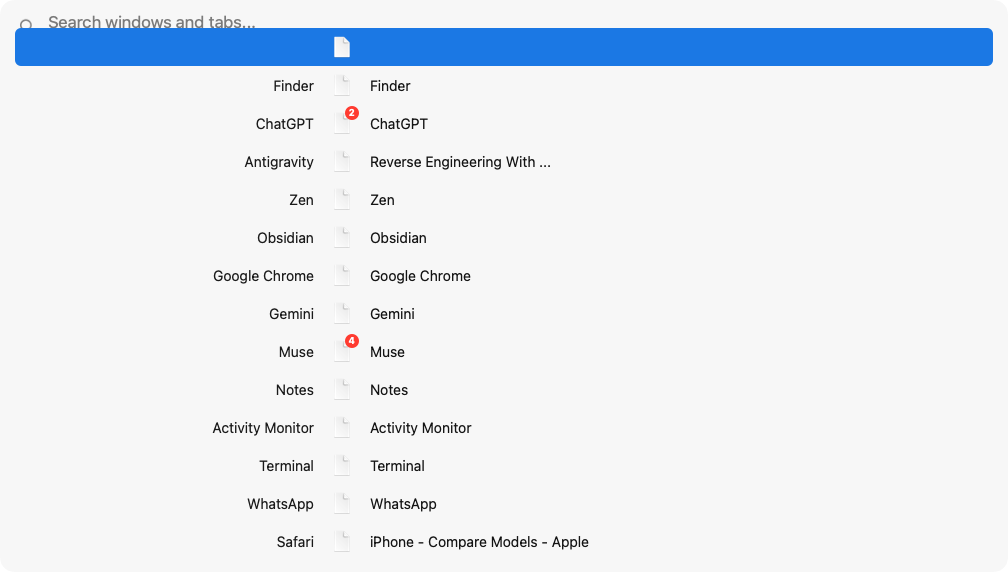
Everything you need to move at the speed of thought.
Unified Windows & Tabs
Standard macOS ⌘Tab only switches apps. Task Manager surfaces individual application windows and open browser tabs (Chrome, Brave, Arc, Edge, Safari) in one unified switcher.
Sub-Millisecond Search
Instant fuzzy matching with smart acronym recognition. Type 'gc' for Google Chrome, 'gh' for GitHub, or 'code' for VS Code with zero latency.
Quick Number Keys (⌥1..⌥9)
Bypass scrolling and cycling. The top items are tagged with number keys—press Option + 1 through 9 to jump directly to any window.
Drag-and-Drop Workspaces
Group windows into clean, persistent project workspaces. Hold Option while dragging to bundle all windows of an application at once.
Keep your hands on the keyboard.
Activate & Cycle
Hold Option and tap Tab to cycle. Release to activate.
Instant Search
Opens the switcher with search bar focused immediately.
Direct Jump
Jump straight to any top result without cycling.
Activate
Switches to selected window across displays and Spaces.
Close Window / Tab
Closes the selected window or browser tab directly.
Group Application
Bundle all windows of an app into a workspace group.
Ready to switch at the speed of thought?
Free and open-source. Download the universal release binary for Apple Silicon and Intel Macs.
macOS 14.0+ Sonoma & Sequoia • Universal Binary • 100% Offline